Here are ramblings about my time and experiences as a Microsoft 365 Developer using Microsoft 365, Azure, Power Platform and more. Please feel free to explore and reach out on social media.
Saving and Working with Attachments in Copilot Studio
Introduction Recently, I was building an agent in Copilot Studio (Classic) that needed to accept files from chat and save them later in the flow. The common approach is to pass a single file straight to a tool call using System.Activity.Attachments - but you can only pass one file, not the array. That works for simple cases, but it introduces two problems: It does not handle multiple files. If you have more than one file in a single message, you can only save the first or last one. The agent will also only call the tool once System.Activity.Attachments only exists on the current activity, so attachments can be lost if you perform other actions first The main reason for this issue is the agent is using the Bot Framework’s System.Activity object, which is designed to last for a single turn. Once the turn is processed, the attachments are no longer available. ...
Indexing additional SharePoint metadata in Azure AI Search
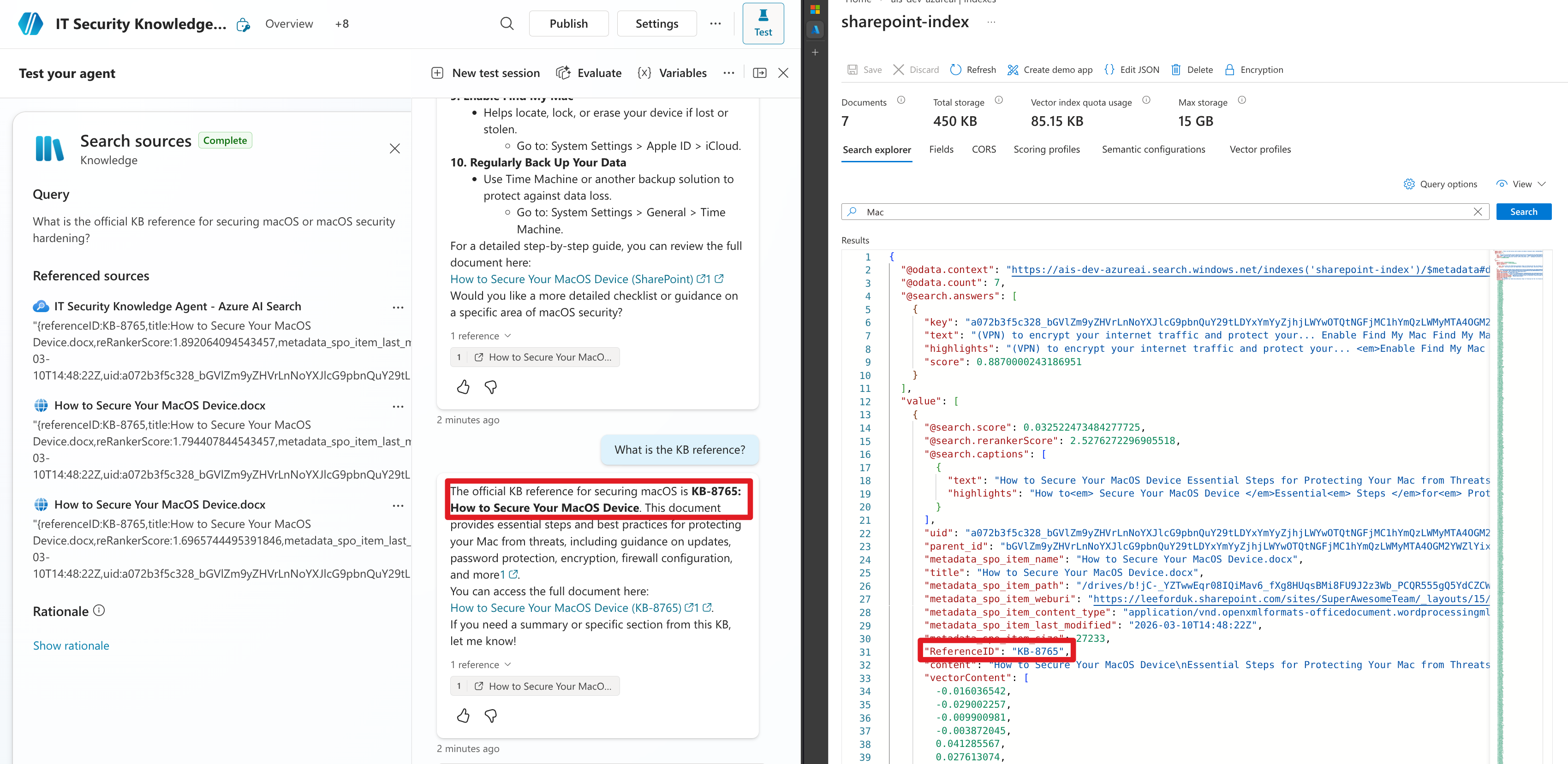
Introduction In my previous post, I went through how you can index documents from SharePoint in Azure AI Search and how this might benefit your agent over the built-in SharePoint integration. One key benefit that I didn’t touch on is that you can bring in additional columns from SharePoint that are not currently exposed, but you can using Azure AI Search. I covered why this might be important in a recent blog post. ...

SharePoint Knowledge Sources in Copilot Studio: The Metadata Problem
Introduction Copilot Studio makes it super easy to add SharePoint as a knowledge source to your agents. However, there is one issue that I’ve noticed, which is that we cannot read the properties (metadata) of the documents in SharePoint. This is a problem because often important information about the document is not in the content itself, but rather in the properties of the document. Take this example below. The agent has been granted access to a document library. I have added a couple of documents and purposefully added a value to the property called ReferenceID that is not in the document content itself. When I ask the agent to provide the value that would be in the ReferenceID property, the agent is not able to provide the value. If the value was in the document content, the agent would be able to provide it. ...
Consuming Agent 365 MCP servers with M365 Copilot declarative agents
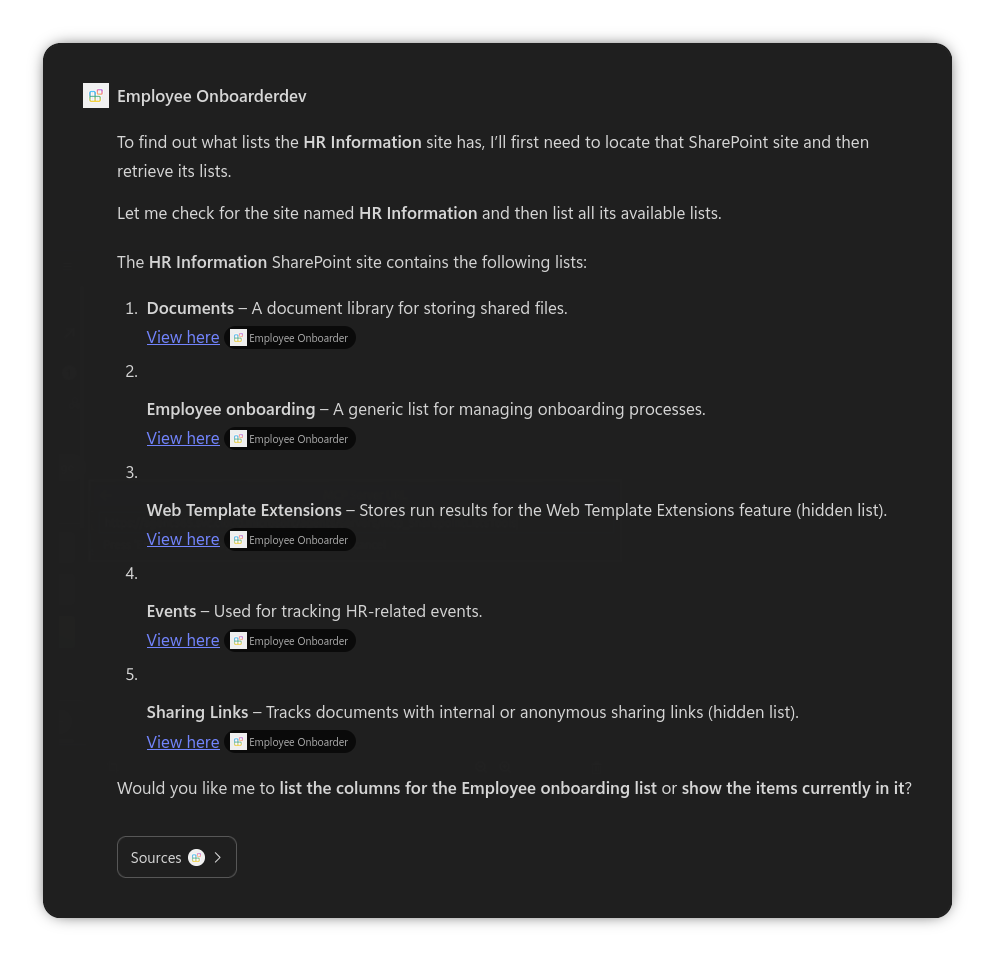
Introduction Announced as part of Agent 365 at Microsoft Ignite 2025, MCP servers with access to Microsoft 365 services were announced. This was great news as up until then, you had to build your own servers to connect to Microsoft 365 services. However, it was not clear if it was only possible in Copilot Studio agents, or if you could use it elsewhere, such as in declarative agents. I’m here to report it is indeed possible - let me show you how. ...
How to index SharePoint content using Azure AI Search for Copilot agents
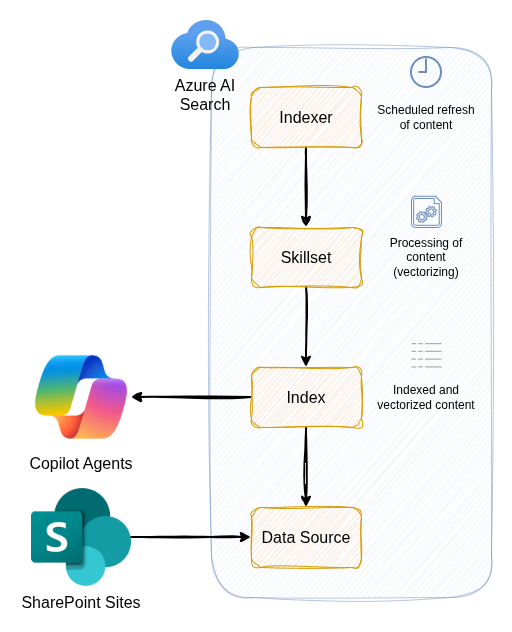
Introduction As of December 2025, this feature is in public preview - more information can be found in the official documentation. Whilst it is possible to shortcut some these steps by using the Azure AI Search SharePoint agentic knowledge source, this doesn’t produce great results with Copilot out of the box, for example citations don’t link back to the original SharePoint document. Whilst in theory, M365 Copilot agents can use a built-in SharePoint knowledge source that leverages a semantic index, in practice, it can be hit and miss (inconsistent, not always matching to most relevant content, etc.). ...
Microsoft 365 Copilot Plugins Explained
Example plugin in use Introduction In this article I’m going to go over how you can bring in (and modify) external data in to M365 Copilot (or just Copilot from here on in) by the use of plugins. Copilot has had many names since launch (e.g. “M365 Chat” in Teams), but it is currently called just “Copilot” within Teams and M365. There are two current methods to bring in data in to Copilot: ...
Paging and Delta Updates in Graph API
This is a quick blog post to summarise how to work through paging and delta updates in Graph API. Examples are in Typescript but you can adapt to the different SDKs Microsoft provides. Paging If you’ve called an API before you will most likely encountered paging before. Paging is where you receive a “page” of data, instead of all of it one go (think a page in a book as opposed to the whole book). Paging works in that you request each page separately from an API and, if required, request multiple pages if more data is required. ...
Microsoft Graph SDK `n.call is not a function`
The problem This will be a quick one today. I recently came across this issue when running an (Node.js) application using the MS Graph JavaScript SDK in production (fine in development). This is most likely a weird edge case in my configuration or how I built my application, but wanted to put it out there in case anyone else has this issue. Whenever I was calling a Graph endpoint it was returning an error message body: n.call is not a function with a status code of statusCode: -1, which didn’t give me a lot to go off of! ...
Using Teams PowerShell Unattended
Introduction If you are responsible for administering Teams within your organisation, you’ve almost certainly come across the Teams PowerShell module. It is used for pretty much all admin and configuration tasks within Teams. If something can be done in the Teams Admin Center (TAC), it will almost certainly be able to be achieved in Teams PowerShell - and in many cases only in Teams PowerShell. And - if you are like me - when running repeatable tasks or commands, I think automation and hence this article. ...
Manage Teams Devices in Graph
Introduction Have you wanted to manage your Teams devices within a script, or from the command line? Well, now you can. I will cover how you can do this for pretty much any Teams Device that is provisioned in Teams by using Microsoft Graph. What can you do? As of 7th June 2022, with Microsoft Graph endpoints can achieve the following: List devices Get device Restart device Get device diagnostics Get device operations Update device software Get device health Get device config There are a couple provisos to be aware of in using Microsoft Graph and Teams devices: ...